
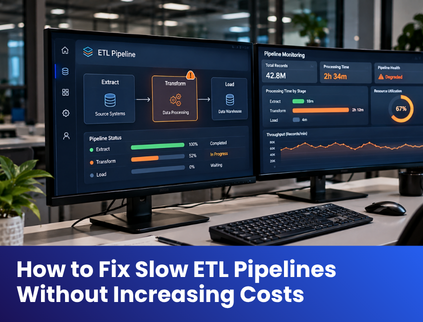
Businesses utilize ETL pipelines to gather information from various locations, convert that information so that it is in a format that can be used by others, and store the converted information in a central location such as a data warehouse, data lake, or other analytical platform. This process allows businesses to have access to accurate, quality data to make decisions based upon reports generated from that data, for business intelligence purposes, to develop machine learning algorithms, and to help with day-to-day operations.
The increased size of the data and the complexity of the business requirements will cause a decrease in the speed of the ETL process. What used to take only minutes to complete could now take hours. As a result, reports are delayed; dashboards are outdated; and downstream applications cannot readily use updated datasets.
When an organization experiences poor performance with their application, they will often believe that their current IT infrastructure does not have the necessary power to meet demands. The typical response to this is to increase the amount of cloud computing resources available, add additional processing nodes to their existing environment, upgrade the storage systems in use, or purchase more costly data platforms.
In addition to improving performance through additional infrastructure, this method may not address the root cause of a slow ETL pipeline. Many times, a slow ETL pipeline is due to: poor design of queries; excessive amount of data processed; inefficient transformation; uneven distribution of workload among resources; and/or poor scheduling of workloads.
Adding infrastructure without resolving the above-mentioned issues can increase cloud computing expenses, but will not address the performance problems.
Optimizing the way you process your data is a more efficient and effective way to manage your company’s growing need for computing capacity than continuing to add hardware. Optimizing the efficiency of your ETL pipelines will help you decrease the amount of time it takes to process your data, deliver your data faster, and help keep down your costs of operation.
Why Do ETL Pipelines Become Slow?
A typical ETL pipeline consists of multiple steps that include extracting data from sources, transforming the data into a usable format, validating the quality of the data, and finally loading it into a destination system. If a bottleneck occurs at any step in the process, the overall workflow may be delayed.
An example of this would be when a retailer is collecting customer purchases, product details, inventory levels, and payments made through different systems. The retailer then needs to take all these separate sets of data and clean them up, combine them together, make sure they are correct, and load them into a single data repository.
In the event that there are inefficiencies in joining during the transformation process and/or you continually process historical records, then your pipeline could potentially require much more time than what you anticipated.
Several technical issues commonly contribute to slow ETL processing.
1. Inefficient Data Transformations
One of the most expensive and time-consuming steps of an ETL process is typically the data transformation step.
When business processes are poorly designed, for example when performing operations on data (i.e., filtering, sorting, joining, aggregating, deduplicating, converting format), it will cause unnecessary use of computer resources (CPU, RAM) and time to process the data.
As an example, a pipeline can load the complete customer data set (which contains several million records), yet the reporting process after that will only need those records that have been processed during the last seven days.
Processing extra data causes longer processing times and adds to the workload.
Also, using long-winded complex math formulas over and over, using slow user-defined functions, and making many unneeded data transformations can cause the data to process more slowly.
How to resolve this issue: Examine your transformation process and eliminate any unneeded steps. Filter the records at an earlier stage in the process, choose the specific columns you need, and use results from previous expensive calculations if you can.
2. Poorly Optimized SQL Queries and Joins
SQL queries are typically employed in ETL (Extract-Transform-Load) pipelines to integrate and alter data from multiple source systems.
However, inefficient SQL queries can create significant performance bottlenecks.
In order for a business to combine their customer data with their transaction data, product data, and payment data, they should consider using a pipeline that filters out irrelevant records before combining the large datasets. Otherwise, the processing system will have to transfer and process an extremely large amount of data.
In a distributed environment like Apache Spark, this may lead to more shuffle operations, higher memory usage, and longer running times.
Other common SQL performance problems include:
- Joining large tables without appropriate filtering.
- Using unnecessary SELECT * statements.
- Performing repeated subqueries.
- Joining on poorly distributed keys.
- Running expensive aggregations multiple times.
- Working with inaccurate table statistics.
How to resolve this issue: Optimize how SQL plans are executed; filter your data prior to joining it; choose only the columns that you need; and analyze your methods of joining. You should also consider using broadcast joins when dealing with smaller lookup tables to minimize the amount of data moved unnecessarily.
3. Processing More Data Than Necessary
The most common reason for an ETL pipeline to slow down is when you are processing the same historical data over and over again.
The example used for this is an e-commerce company that receives thousands of new orders each day. The ETL pipeline that processes those orders, on the other hand, will load and process the whole order history when new records are added to the system.
Because the size of the database is growing, the pipeline must process increasingly large amounts of data. Most historical records, however, will not change.
This creates unnecessary workloads and increases cloud infrastructure costs.
How to resolve this issue: Apply incremental data processing. Do not re-process the entire dataset; rather, determine which records are either new or modified and then process only those records.
Change data capture (CDC), timestamp-based extraction, and incremental load are techniques that can reduce the amount of unnecessary processing.
4. Data Skew and Poor Partitioning
Distributed data processing frameworks partition large amounts of data into smaller subsets that can be processed concurrently by several processing units.
However, poor partitioning can create uneven workloads.
For instance, a customer transaction dataset could consist of hundreds of thousands or even millions of rows; however, only a handful of customers create a majority of the transactions. Therefore, if the pipeline splits the data by customer ID, there will be some partitions that have a much higher count of rows than other partitions.
This is known as data skew.
Most processing tasks are completed within a short time frame; however, some tasks which have become over-burdened with processing requirements will run indefinitely. Therefore, the total processing of the ETL pipeline cannot begin until all tasks have finished.
Poor partitioning may cause too many small tasks to be created, which would increase the cost of scheduling.
How to resolve this issue: check how large the partitions are and how the workload is distributed. Use a good partition key, change the number of partitions if needed, and apply strategies like “key salting” or “adaptive query execution” when you have data skew.
How to Fix Slow ETL Pipelines Without Increasing Infrastructure Costs
Businesses should determine if their current computing resources are being utilized effectively before purchasing additional ones.
The following are some of the ways that you can use to optimize your ETL pipelines to get maximum performance out of your cloud-based infrastructure and help reduce your operational costs.
1. Optimize Transformations Before Adding More Compute
The first step is to examine how data moves through the transformation process.
Many pipelines have additional steps that are not required for a better end product but do take away from processing efficiency.
For example, a pipeline may make many changes to an entire data set prior to taking out records that have no bearing upon the final report.
An even better way to do this is to get rid of unneeded rows early on and strip away unneeded columns prior to starting the costliest parts of the process.
This reduces the volume of data that must be processed by subsequent stages.
Businesses can additionally look at repeating the same complicated calculation. When a single complex transformation has occurred on more than one occasion, the results can either be utilized again or can be part of a well-organized intermediate data set.
The objective is to reduce the total amount of work performed by the pipeline.
2. Implement Incremental ETL Processing
The use of incremental processing is a highly effective method for reducing the amount of redundant ETL workload.
In traditional full load processing, all data in a dataset is processed by being extracted and transformed each time the pipeline is executed. On the other hand, in incremental processing, only new or updated records (since the last successful execution) are processed.
As an example, a large financial services company may have millions of customer transactions on file. The company would not want to process all those transactions every hour; instead, the company would only extract the transactions from the past hour.
Common approaches include:
- Change Data Capture (CDC): Identifies inserts, updates, and deletions in your source system.
- Timestamp extraction: It is used to extract records that have been updated since a specific time.
- Watermarking: Tracks the latest successfully processed record or event.
- Incremental loading: Updates destination tables with only updated data from the source, rather than recreating the whole dataset.
Incremental ETL reduces data extraction, transformation, and loading workloads.
Businesses must also consider how to handle records that arrive late, delete records, handle duplicate records, and recover from failures during a pipeline execution. It is therefore necessary to have robust checkpointing and recovery capabilities.
3. Use Partition Pruning and Predicate Pushdown
Reading extraneous information from your storage can cause the ETL process to take longer than necessary.
By using partition pruning and predicate pushdown, the volume of data that needs to be scanned when executing a query can be reduced.
Partitioning provides a processing engine with the ability to “skip” partitions that are not necessary for a particular query.
If, for example, a transaction table has been partitioned into years and months, then when the pipeline processes October transactions, it does not have to search through all of the previously created partitions.
Predicate pushdown enables some types of filters to be executed closer to the data source and therefore reduces the quantity of data that needs to be transferred to the processing engine.
These methods can be especially effective when you have to work with big data sets that are in column-based format (i.e., Apache Parquet).
When businesses create the partitioning strategies, they need to use the actual query patterns of their users to determine how many partitions will be needed. Creating an excessive amount of partitions is not effective if there isn’t a clear reason for doing so.
4. Optimize Join Operations and Reduce Data Shuffling
Joins are necessary to combine data from different sources. However, as the volume of data being joined increases, so does the cost.
A shuffle operation occurs when data needs to be transferred among worker nodes in a distributed computing environment.
Shuffling too much causes an increase in network traffic, hard drive activity, and RAM usage.
To improve ETL performance, development teams should:
- Filter records before performing joins.
- Remove unnecessary columns from both datasets.
- Use appropriate join keys.
- Review data distribution and partitioning.
- Use broadcast joins when one dataset is sufficiently small.
- Avoid repeating identical join operations unnecessarily.
If a pipeline consists of a large transaction table and a smaller product lookup table, then broadcasting the smaller table can potentially eliminate the necessity of using a shuffle-based join that would typically be more costly.
The optimal approach will be based upon the amount of data, the amount of memory available, the way in which the data is distributed, and the execution engine’s query plan.
5. Choose the Right Data Format and Storage Structure
How well your ETL (extract, transform, load) pipeline reads and processes data is directly affected by the data storage format you choose.
The CSV (Comma-Separated Values) and JSON (JavaScript Object Notation) formats are beneficial when you want to exchange data with others. However, you will have to parse and process the data more if you use either of those formats compared to a format that is designed specifically for analytical workloads.
Apache Parquet and Delta Lake are both able to help increase the speed at which data is processed. Both of these tools use a columnar format for storing data. They can also use various types of optimization techniques to avoid having to scan through the entire dataset to find what you want.
For example, if a pipeline only needs the customer’s ID, the date of the transaction, and how much they paid for the item(s) purchased, then using a columnar format would enable the engine to read only those specific columns.
Businesses should also review file sizes.
Large numbers of small files can result in increased overhead for metadata operations and task scheduling. Conversely, very large files may restrict the degree of parallelism possible.
Appropriate partition size and file compaction will assist in maintaining an efficient storage system.
6. Use Caching and Reusable Intermediate Results Carefully
In many cases, an ETL workload will make multiple requests to the same data sets, or execute the same transformation on a regular basis.
Recomputing these operations during every execution wastes processing resources.
Caching or storing intermediate results can be useful if you use the same data set multiple times during your workload.
An example would be a pipeline that uses a cleaned customer data set to generate reports for sales, marketing, and customer retention.
The pipeline can potentially save time and resources by using a previously saved intermediate dataset rather than having to recompute the same transformations on each subsequent downstream operation.
Caching, however, is not always advantageous. It requires memory consumption and adds additional overhead to the process of using data that will be used only once, or if the size of the dataset is too big to use effectively with the current amount of resources.
Businesses should choose which data they will cache, and then when that data is no longer needed, they should delete it.
7. Improve ETL Scheduling and Workload Management
Performance issues in ETL do not always arise from within the transformation logic. Poorly scheduled processes can lead to delays as well.
Several large pipelines could begin at the same time, which would result in competing for the same computer resources. If this happens, it can lead to longer execution times for all of the pipelines involved, regardless of how well optimized each one was.
The pipeline can be run more often than what is required by the business.
The daily updated reporting dataset doesn’t have to be updated multiple times per day.
To improve workload management:
- Schedule resource-intensive pipelines during appropriate processing windows.
- Avoid unnecessary overlapping jobs.
- Prioritize critical business workloads.
- Use dependency-based orchestration.
- Reduce execution frequency when real-time updates are not required.
- Configure retries and timeouts carefully.
Existing computing resources can be utilized more effectively by business organizations with the help of improved scheduling techniques that allow for increased utilization of these resources without adding additional computing capability.
8. Monitor Pipeline Performance and Identify Bottlenecks
Optimization should be based on measurable evidence rather than assumptions.
To determine exactly which part of the ETL process is consuming the most processing time, businesses need to track each ETL step.
Useful performance metrics include:
| Metric | What It Reveals |
| Pipeline execution time | Overall processing duration |
| Data processed | Volume of records and bytes handled |
| CPU utilization | Processing workload intensity |
| Memory consumption | Memory pressure and possible resource issues |
| Shuffle read/write | Data movement between processing workers |
| Failed tasks | Reliability and execution problems |
| Data throughput | Amount of data processed over time |
| Cost per pipeline run | Infrastructure expense associated with processing |
Teams have several ways to identify slow stages, inefficient queries, and resource bottlenecks. Some examples include: Apache Spark UI, cloud monitoring services, and data orchestration platforms.
For Spark jobs, the execution plan and stage metrics provide valuable insights into why a job is running slowly due to expensive join operations, large data skew, and excessive shuffling.
A Practical Example: Reducing ETL Processing Costs in E-Commerce
The following example is of an e-commerce business using a cloud-based ETL (extract, transform, load) pipeline to process customers’ orders, payments, updates to their inventories, and products.
Its initial daily pipeline will be executed in about thirty-five minutes. As the number of transactions increases, the execution time will rise to approximately two hours.
The business believes that its current computing power is inadequate, and therefore is considering upgrading its computing environment.
However, a technical review reveals several underlying problems:
- The pipeline reloads the complete order history every day.
- Several transformations process columns that downstream reports never use.
- Large datasets are joined before unnecessary records are filtered out.
- A few heavily populated partitions create data skew.
- Multiple reporting jobs repeat the same customer data transformations.
Instead of immediately adding more computing power, the dev team implemented several optimizations including: incremental loading; optimizing joins; removing unused columns; adjusting partitions; and utilizing existing intermediate data.
The team then measures execution time, the amount of data processed, and the usage of the infrastructure both prior to and after making changes.
Using current resources, this method will lead to an increased speed of the pipeline through less extra processing and less usage of resources.
The specific amount of performance gain achieved through these changes will vary depending upon the type of workload being run; however, this example illustrates a very critical concept: improvements in the way we process data can lead to increased performance levels without necessarily requiring us to add more hardware or other types of resources.
Best Practices for Long-Term ETL Pipeline Optimization
It’s very important to resolve current bottlenecks within a business; however, it’s just as important to ensure that similar performance issues do not occur again.
A sustainable ETL optimization strategy should include:
- Regular performance audits: Regularly assess how well your pipeline is performing by reviewing when it starts running, how often it fails to complete successfully, and how much resources (such as memory) it uses.
- Standards for transforming: create repeatable development patterns and eliminate extra processing steps.
- Incremental processing: wherever business needs allow for it, use CDC and incremental loading.
- Data quality reviews: Review your incoming data as soon as possible, so that you do not spend a lot of time and money on correcting errors after they have been processed.
- Workload monitoring: Monitor the usage of resources and identify those pipelines that are competing with each other for compute power.
- Scalability in Architecture: Design data pipelines to accommodate larger amounts of data without creating additional complexity.
- Cost tracking: Track how much money was spent on each run of your pipeline and find which of your jobs are the most expensive.
Organizations should validate optimization changes by testing against representative data sets. Techniques that are effective for one type of workload may not provide the same benefits for other types of workloads; therefore, any improved performance should be confirmed prior to being deployed into production.
When Should Businesses Consider ETL Architecture Modernization?
Sometimes, individual query and transformation improvements are not enough.
Older ETL systems can include tightly-coupled processes, redundant business logic, old technology for connecting to other systems, and inefficient ways of moving data.
When this happens, companies will likely need to implement an even wider-ranging strategy for modernizing their data pipelines.
This can include changing the workflow for how data is ingested into the system, using a modern tool to orchestrate the process, implementing an incremental data processing method, improving the architecture of where the data is stored, or moving those parts of your systems that make sense to be moved to a modern lakehouse platform.
These enhancements may be supported by technologies such as Apache Spark, Databricks, cloud-native data integration platforms, and current orchestration tools.
Modernization begins by understanding existing performance problems and business requirements. Just moving a poorly functioning pipeline to a modern platform does not automatically make the pipeline functional.
The goal is to develop an architecture for data delivery that provides reliable data promptly and allows for control of both the cost of processing and the infrastructure.
Conclusion
Slow ETL processes do not necessarily mean that your organization requires additional hardware resources. Oftentimes, the actual issue with slow ETL processes relates to how you extract, transform, distribute, and load your data.
The inefficiencies of a transformation process, the repetition of steps, the cost of joining tables, an uneven distribution of data across nodes in a cluster (data skew), and the inefficient management of workloads are all factors that contribute to increased processing times for data, which also requires additional cloud resources.
Therefore, businesses must check how well their pipeline is performing before adding more computational power.
Organizations can reduce costs and increase the speed of their ETL pipelines by adding incremental processing, optimizing SQL queries, eliminating unneeded data scanning, enhancing the use of partitions, and monitoring each workload.
The ultimate goal is to create data processing systems that can reliably handle large volumes of data and produce high-quality, timely results while keeping the cost of operating these systems within reasonable limits.
Frequently Asked Questions (FAQs)
1. Why are ETL pipelines running slowly?
The most common reasons why ETL pipelines slow down include: ineffectively transforming data, using high-cost SQL queries, processing all the data when only part of it is required, not properly partitioning data, having a large amount of data distributed unevenly (data skew), and running multiple jobs at the same time.
2. How can I improve ETL pipeline performance without adding more servers?
The transformation logic should be optimized; incremental loading implemented; unneeded scans eliminated; joins improved; partitions managed; and resource usage monitored prior to adding more infrastructure.
3. What is incremental ETL processing?
Incremental ETL processing only extracts and transforms records that have been created or updated since the last ETL process was run. This is in contrast to the traditional ETL method, which processes the entire data set each time the pipeline runs. Incremental ETL processing has the potential to decrease processing time and resource usage.
4. How does data partitioning improve ETL performance?
Partitioning splits large data sets into smaller pieces. This is done by splitting based on the most common query filters used, so that processing systems can scan only those partitions that are relevant to each filter, rather than the entire data set.
5. What causes high shuffle operations in Apache Spark?
Large amounts of shuffling typically occur as a result of joining large datasets, performing aggregations, repartitioning, and redistributing data among different worker nodes. To minimize excessive shuffling, it is important to filter out unwanted data as soon as possible and select the most suitable join and partitioning methods.
6. Can ETL optimization reduce cloud infrastructure costs?
Yes. When you use efficient transformations, incremental processing, less data movement, and improved workload scheduling, you will reduce your use of compute and storage resources. Your actual resource reduction depends on the type of workload and the platform you are using.