
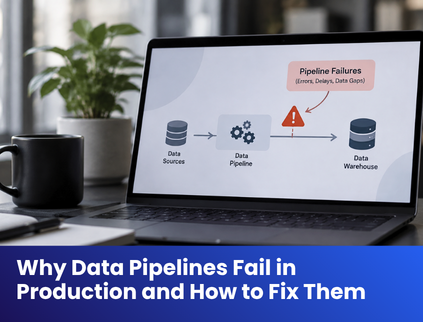
In order to create modern data engineering, data pipelines are the foundation. They retrieve data from databases, applications, API’s, files, and stream sources; process that data; and then deliver it to data warehouses, lakehouses, and analytical platforms. Data pipelines are essential for businesses to produce reports, track performance, develop machine learning models and make informed decisions.
However, a data pipeline that functions properly during development can fail when used in production. For instance, jobs can fail to complete, source systems can be inaccessible, incoming data formats can vary, or processing delays can result in the display of outdated information on dashboards.
The negative impact of these failures is not limited to just technology. Reliability issues with your data pipeline will result in inaccurate reporting for your organization, delays in making business decisions, disruptions to application performance, and additional cost to support the increased use of cloud-based resources.
The reason that data pipelines fail in production is a critical factor in developing reliable data infrastructure. Organizations must understand the most frequent failure mechanisms of their data pipelines, establish robust monitoring systems, manage the quality of the data flowing through the pipeline, and construct pipelines that can recover quickly from disruptions.
The following paragraphs describe the primary data pipeline reliability issues that exist today, along with some real-world approaches to enhance production stability.
What Is a Data Pipeline?
A data pipeline is a series of operations that move data from at least one source to a final location. During this movement, the data can be validated, cleaned, altered, enhanced, or combined.
A typical data pipeline includes several stages:
- Data collection: Collecting data from a database, API, files, or from a stream.
- Data transformation: The process of converting raw data into a form that can be used for analysis. This involves both cleaning up the data and organizing the data.
- Data validation: Checking whether the data meets expected quality rules.
- Data storage: Writing processed data to a warehouse, lakehouse, or database.
- Data Monitoring: Keeping track of the progress of executions, the quality of data being processed, delays in processing time, and failure rates.
For instance, an e-commerce firm can use a data pipeline to pull down daily sales data, merge it with their customers’ profiles, determine the amount of revenue generated, and send that information to a business intelligence dashboard.
When the pipeline doesn’t work for processing new transactions, the dashboard could show old data about revenues. This shows that data pipeline reliability is a need of your company (a business requirement) and not only a problem that you have to solve in terms of technology.
Why Data Pipelines Fail in Production
1. Unreliable Source Systems and External APIs
Data pipelines typically rely upon other types of software, such as payment processing systems, customer service systems, third party API’s, and the organization’s own internal production database(s).
These sources can have temporary problems such as downtime, rate limits, authentication failure, network interruption, and/or slow response. If a pipeline expects all sources to be available at all times, then a temporary problem with one of these sources can halt the entire workflow.
A pipeline that retrieves information about customers from a third-party application programming interface (API) will be unable to run if the service sends back an HTTP 429 response indicating that the user has reached their maximum number of requests.
How to improve reliability:
Implement a retry mechanism with an ever-increasing wait period (exponential) for consecutive attempts. Set appropriate timeout values for each request and follow API rate restrictions. If applicable, store incoming data in a queue or other form of persistent storage while waiting for the target to become available.
Limit the number of times you retry and use discretion when determining if a retry is warranted. If a permanent authentication or validation error occurs, continuing to repeat the action that caused the error won’t help resolve the issue.
2. Schema Changes Break Data Transformations
A data pipeline typically relies upon an established, pre-determined data structure (or schema) which specifies how the data will be organized into fields and/or records with specific data types and relationship connections.
When a source system makes a change to its data model (schema), any subsequent transformation processes that depend on this data model will likely cease to function properly.
For example, if a source system renames a field (e.g., from customer_id to client_id) but a subsequent transformation process in your data pipeline is programmed to look for customer_id, then you may experience either a failure of the pipeline or the generation of incomplete results.
Changes to the schema may also create new fields, alter the types of data stored in those fields, or delete columns used by other applications.
How to improve reliability:
Where possible, develop schema validation mechanisms, and create a structured way of dealing with modifications to the initial source data. If possible, utilize schema evolution techniques to allow for compatible modifications; however, be careful when allowing all modifications to occur automatically.
Before you deploy your code, make sure to use version control on the important data contracts and notify other teams of any changes that will break things. You should also run tests with realistic data to see if the transformed data is still valid and check with the teams who consume your data to confirm they can work with the new format.
A managed approach to controlling your database schema can reduce the risk of unforeseen production issues.
3. Poor Data Quality and Unexpected Records
Even though a pipeline is successful at executing, it can still produce wrong or incomplete data.
Missing data, duplicate entries, incorrect time stamps, non-standard formats, and conflicting IDs will affect the quality of downstream analysis. In some cases, the problem can be difficult to identify since the pipeline appears to be working correctly.
For example, a sales pipeline may have processed transactions with duplicate order ID’s. The job finished with no problems, however, the revenue reports were counting some transactions more than one time.
How to improve reliability:
At each step in the pipeline, create and run data quality checks. Verify that all required fields are populated correctly; verify that each field contains the correct type of data; verify that each record is unique within the dataset; verify that values for each field fall within the expected range; and verify that there are valid relationships between records.
The actions taken when data is found to have failed a validation check depend upon the specific needs of the organization. Invalid records may be placed into a quarantine area for review and possible correction before further processing. Valid records can proceed to the next stage in the process.
Monitor the quality of your data over time, and notify the appropriate department if the percentage of errors is higher than what you consider to be acceptable. Doing so will help identify silent data loss before it impacts the way you make business decisions.
4. Incorrect Scheduling and Dependency Management
Production-level data pipelines often rely on other processes (or jobs). For example, a reporting pipeline might need the customer data process to complete so that it can then join the customer data with the sales transaction data.
Inadequate configuration of dependencies can cause downstream jobs to begin executing prior to completion of all of their input requirements.
Scheduling problems can also develop when jobs execute too often, compete with prior job runs, or go over the time limit that is anticipated for completing a process.
How to improve reliability:
An orchestration platform is used to define dependencies, when tasks are executed, how many times to retry if a task fails, and how to handle failures.
When designing your workflow, you should make sure that the downstream task does not start until all of the necessary input data has been received and verified. Also, set a time limit for the run of each task, and prevent multiple tasks from running at the same time if they might produce different outcomes.
Track the time spent on each task, and revise schedules if the amount of time needed to complete tasks changes.
Clear dependency management reduces the probability of a race condition and ensures that all required data moves completely through the pipeline.
5. Insufficient Compute Resources and Performance Bottlenecks
Pipelines can function well on a small development data set; however, they can become bogged down with larger production volumes.
Large joins, skewed data, inefficient transformations, too many small files, and not enough memory are all causes of performance problems in Spark jobs.
In some cases, such as when you are processing a large amount of data using Spark and need to join two very large datasets, you might need a lot of memory and/or have to do a lot of shuffling. When one join key is present significantly more often than the other join keys, some of your tasks will likely process significantly more data than the other tasks.
How to improve reliability:
Use execution metrics, query plans, and resource usage information to measure the performance of your profile pipeline. Join optimization, early removal of unneeded records and avoidance of repeated processing of unchanged data.
For distributed workloads, investigate the data distribution, the amount of data transferred between nodes (shuffle), how the data is partitioned on each node, and the physical organization of the files containing the data. If the performance metrics indicate that the workload actually needs additional computing resources, scale up the computing resources.
Compute capacity increase alone is not always the best way to improve performance. Improving inefficient transformations and/or poor data organization could lead to longer-term improvements.
6. Network Failures and Partial Writes
When you use data pipelines to transfer information from one distributed system to another, there are several things that could cause an interruption in the pipeline’s operation. These include but are not limited to network issues, hardware/storage failures, and communication timeout errors.
A very difficult scenario arises when a pipeline has successfully written some data; however, the process failed prior to completion of the entire operation. When the next run of the same pipeline begins at the starting point, if the previous partial write was not taken into account, there could be duplicate or inconsistent records.
How to improve reliability:
The use of storage formats and processing systems that provide adequate transaction guarantees will allow readers to view a complete and consistently committed set of data as opposed to viewing a partially written dataset when possible through the use of atomic writes.
For incremental pipelines, use checkpoints or processing states that are durable. Be explicit about how you will recover from failures, and test your recovery methods when you have actual failure scenarios.
In addition to monitoring network errors, you should also be aware of how much space is available on your hard drives and whether there are any write errors as well, in order to identify possible issues with the underlying hardware as soon as possible.
7. Duplicate Processing and Non-Idempotent Operations
In addition to being critical for ensuring reliability in production environments, retries can also pose serious issues if a pipeline attempts to re-run an operation that was either completed (fully or partially) in the past.
An operation has idempotency if, when you run it multiple times, the results will be identical to running it once.
Consider a pipeline which adds daily sales totals to an already existing table. When a job has failed to write the total daily sales but did complete the task, a retry could potentially add the same daily sales totals again.
How to improve reliability:
Pipeline design to allow safe repeated executions of the same pipeline. Depending upon your application requirements, you can achieve this through many different methods including: deterministic record identifiers, de-duplication, transaction-based write operations, or MERGE operations to modify existing records rather than creating new duplicates.
Track processed data for incremental processing and establish how checkpoints move forward upon successful completion.
When a pipeline performs other types of outside side effects, such as sending notifications or initiating payment processes, you should be particularly cautious because the repetition of such side effects may lead to consequences beyond your data platform.
Best Practices for Improving Data Pipeline Reliability
The solution to fixing each error individually will help with the short term; however, long-term reliability comes from a consistent engineering process.
1. Implement End-to-End Pipeline Monitoring
Monitoring should cover more than whether a job succeeded or failed.
Track pipeline executions, process times, the number of records coming into and out of the pipeline, how often errors occur, when the most recent data is available, and how much resource was used.
A pipeline could be reporting that it succeeded in running a process on fewer records than anticipated. Tracking how many records are being processed will help to find problems with the pipeline even if there are no errors in its code.
Dashboards and alerts should be used to notify the appropriate team of a critical threshold being reached.
2. Establish Data Quality and Freshness SLAs
An agreement on a service level (SLA) defines the level of service that is expected. In regard to data pipelines, this can define when data will be available, what the completion rate of the data should be, and the response time for resolving issues.
For example, a business would need to have sales information available each morning at 7:00 am on every workday.
Teams should establish measurable objectives for how current data needs to be (freshness), how complete it must be (completeness), and how quickly the system should recover after a disruption (pipeline recovery). These types of objective targets allow teams to prioritize issues based on their potential to affect the business as opposed to evaluating every issue as if they were equally important.
3. Build Automated Testing Into the Pipeline
Production reliability improves when problems are detected before deployment.
For the transformation logic, you should run Unit Tests. For connecting to the source and destination systems, you should run Integration Tests. To verify that your output matches what is expected, you should run Data Quality Tests.
To test for the impact of changes in schema, empty data sets, duplicate records, late-arriving data, and invalid values. As well as testing how to recover from an execution being interrupted when dealing with complex pipelines.
Automated tests help to minimize the possibility of creating new issues with the introduction of updates to the pipeline logic.
4. Design Effective Retry and Recovery Mechanisms
Not every failure requires manual intervention.
Transient errors (e.g., short-term network disruptions) can be handled by retrying the action with some form of control over the retry process.
Failures that cannot be resolved via retries will require alternative action; examples include correcting invalid credentials, handling an unexpected schema, or increasing resource availability.
Provide definitions for retry limits, backoff intervals, alerting rules, and escalation procedures.
Most importantly, make sure that when you restart a pipeline, you aren’t quietly creating duplicates of existing records or causing corruption to downstream data.
5. Use Incremental Processing Where Appropriate
New data may be added over time, which would result in higher processing times and greater use of resources if you were to reprocess all of the data each time.
Incremental Data Processing works by processing new and/or updated records. Depending upon the design of the source system/architecture, the method used for determining what records require processing can include using timestamps, Change Data Capture (CDC), offsets, and/or Checkpoints.
Late-arriving records, updates, deletions, and historical corrections must be handled properly when using incremental processing for efficiency.
Select an approach that will allow you to maintain the accuracy of your data but reduce the amount of unnecessary labor.
6. Document Ownership and Incident Response
All critical pipelines must be clearly owned by someone who is responsible for their reliable operation, ongoing maintenance, and the ability to respond to incidents.
Documentation should provide details about where the data comes from (data sources), what has happened to it (transformations), other parts of the system that rely on it (dependencies), when it is run (expected schedules), what can go wrong (failure scenarios), and how to fix it when things go wrong (recovery procedures).
Create an incident response plan to determine which people receive notifications regarding incidents, how problems will be analyzed, and when customers (downstream consumers) need to know about issues.
After major events occur, investigate the reasons for the failure, and determine what steps can be taken to prevent future failures of this type.
Practical Example: Improving a Failed Production Pipeline
The following is an example of a retail business with an e-commerce platform that uses a daily data pipeline to process online orders. In this scenario, the pipeline retrieves the orders from an API, then applies some transformations to the order data before loading it into a data warehouse to produce reports.
A source system update results in the API returning a different field structure. During transformation, the pipeline fails, resulting in an incomplete morning sales dashboard.
The engineering team conducts an investigation to determine why the transformation was dependent upon a field whose name had changed. Additionally, they identify that the pipeline is lacking a dependable notification system for notifying users of missing records.
The team resolves the initial schema issue, implements schema validation, creates automated testing for the required fields, and sets up alerting for pipeline failures and anomalous record counts.
It will update the recovery process to make sure that if the pipeline is run again, there won’t be any duplication of orders that were previously processed.
These changes are addressing both the current failure of the system and the issues that caused this failure to impact production.
The most important thing to remember about building reliable data pipelines is that there are many other components to the pipeline than just being able to handle errors. To build a robust pipeline, you also need to incorporate validation, monitoring/visibility, safe recovery options, and clearly define who has operational control over each component of the pipeline.
Conclusion
Numerous factors can cause a data pipeline to fail in a live environment, such as unreliable source systems, changes to the data model (schema), poor-quality data, issues with scheduling, performance limitations, interruptions to connectivity, and/or potential problems caused by unsafe retrying of failed tasks.
Failures like these may impact the way businesses report, analyze, apply machine learning models to their business problems, and ultimately make operational decisions. A proactive approach to data engineering will be required to resolve these issues.
Organizations should use end-to-end monitoring, enforce data quality checks, automate testing, handle dependency management, create safe recovery options, and document their emergency response procedures.
They need to assess the reliability of their pipelines using relevant metrics including data timeliness, percentage of successful runs, duration of runs, and recovery times.
Ultimately, organizations should develop data pipelines with an understanding that some elements may fail. By implementing robust engineering processes and consistently monitoring the health of their systems, organizations can build data infrastructures that provide accurate and timely information.
Frequently Asked Questions
1. Why do data pipelines fail in production?
Causes of failure can range from problems with APIs (Application Programming Interface), changes in schemas, bad-quality data, inadequate resource allocation, improper scheduling, interruption of network connections, and/or errors during the process of transforming data. Additionally, production workloads may uncover issues that were not apparent when developing the system.
2. How can I improve data pipeline reliability?
Implement automated testing, monitoring, data quality validation, controlled retries, dependency management, and documentation of recovery procedures. Use measurements for data freshness and execution performance to detect issues at an early stage.
3. What is data pipeline observability?
Data pipeline observability is the capacity to determine how a pipeline functions internally via logging, metric tracking, trace analysis, execution logs, and data quality metrics. This enables engineers to pinpoint exactly where and when an issue arises.
4. What is the difference between ETL and ELT pipeline failures?
The ETL pipeline transforms the data prior to being loaded into the destination. Thus, a transformation failure can happen at a point where the data has yet to reach the target. An ELT pipeline loads the data first and then transforms the data in the destination platform. Therefore, if a failure occurs, it will be during downstream processing. Both types of pipelines will need to be monitored, validated, and have recovery mechanisms.
5. How does idempotency improve data pipeline reliability?
Idempotency means that if you perform the same task over and over again, it will produce the same result every time. This is particularly useful when you need to retry a task that failed, or when you are trying to pick up where you left off after having to partially execute a pipeline.
6. Which tools can help monitor data pipelines?
The right combination of tools will depend upon what type of pipeline technology you are using, your operational needs, and the existing infrastructure that you have. Teams can leverage workflow orchestration tools, cloud monitoring tools, data quality frameworks, and/or platform-specific observability features depending on their architecture